
About
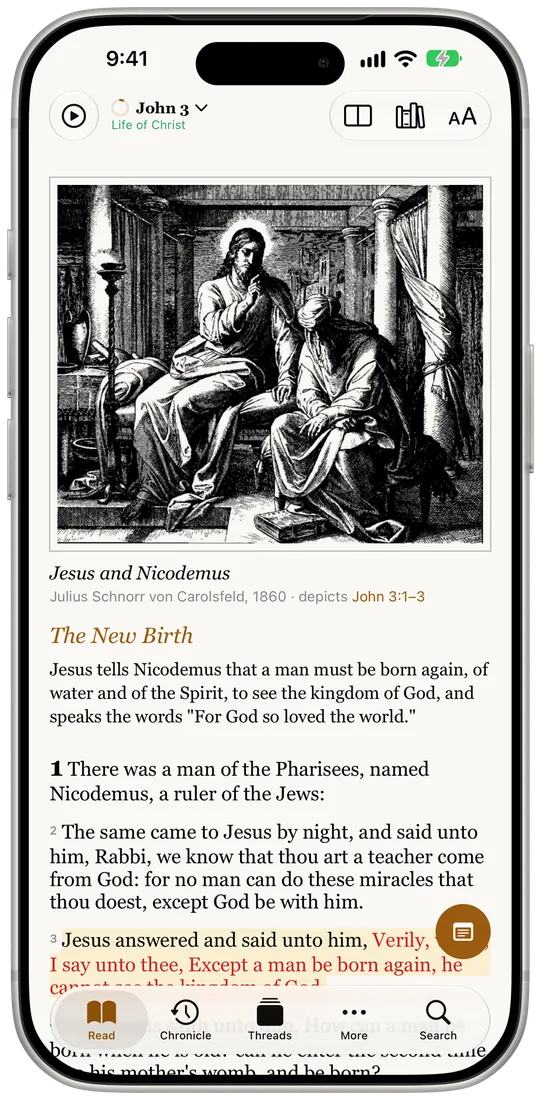
Read a verse per page or by chapter, tap any word for the original language, and follow it through the whole Bible. Commentaries, dictionaries, a timeline and journey maps sit behind the text, and your notes and study threads sync through your own iCloud. For families, 47 illustrated Bible stories read aloud, and historical photographs from the Library of Congress open the chapters and places the engravings don't cover.
Platforms
iPhone & iPad
Bible study
Built with
- Swift
- SwiftUI
- SwiftData
- CloudKit
- SQLite FTS5
- MapKit
- ActivityKit
- Background Assets
- App Intents
- Swift Charts
- PencilKit
What I built
Three SwiftData stores in one container: bundled Bible text, a purgeable cache for online text, and CloudKit-synced user data with merge rules for records two devices create at once.
Full-text and grammar search over a prebuilt SQLite FTS5 index, including 440,000 original-language words searchable by Strong's number, tense and voice.
A licensed translation fetched live from the YouVersion API and transcoded from HTML into the app's own text format, so every reader feature works on it unchanged.
Read to Me: on-device speech with an IPA pronunciation lexicon for biblical names, a Live Activity, a sleep timer and Personal Voice support.
MapKit timelines and animated journey routes, plus a deep-zoom 1878 history chart drawn with CATiledLayer and tappable scenes.
Apple-hosted Background Assets with an ExtensionKit downloader, so 60 MB of story art and photographs download on demand or in the background instead of shipping in the app.
Python data pipelines that turn public-domain lexicons, dictionaries, commentaries, stories and photo archives into validated bundles, with license and rights checks built in.
Siri and Shortcuts, Spotlight, Handoff, hardware keyboard shortcuts and the iPad menu bar.
Screens



How it fits together
Interface
- Scroll feed & Chapters readerSwiftUI
- Word study & searchInterlinear, Strong's, grammar
- Chronicle & mapsMapKit, CATiledLayer chart
- System featuresSiri, Spotlight, Handoff, Live Activity
async loads and SwiftData queries
Services
- BibleService & BibleCatalogBundled or online, per version
- InterlinearServiceIn-memory, loaded per version
- BibleSearchIndexSQLite FTS5, read-only
- ReadingTracker & SpeechServiceReading credit, Read to Me
one ModelContainer, bundle files
Storage
- Bible textSwiftData, bundled, never syncs
- Online cacheSwiftData, 30-day expiry
- User dataSwiftData + CloudKit
- Reference bundlesCommentaries, lexicons, maps
fetch, sync and build
Outside the app
- YouVersion APILive NASB text, per chapter
- iCloudPrivate CloudKit database
- Python pipelinesPublic-domain sources to validated bundles